Safety and liability. Mains (230 V) wiring can be fatal. This page provides general information: it is not a set of installation instructions, and it does not replace an electrician, the product’s own instructions or the applicable standards. Leave the wiring to an electrician; if you do it yourself, you do so at your own risk. To the extent permitted by law, BudaiLux accepts no liability for damage arising from the use of the information on this page. More on liability
A light with a motion sensor is convenient and saves energy: it is only on when someone is there. But if it is wired or set up wrongly, it comes on in daylight, reacts to every car at night, or fails to come on just when it should. Most of these faults come from the wiring, the mounting position, and the setting of three small knobs — LUX, TIME and SENS.
This article shows how manufacturers wire a motion sensor and a dusk-to-dawn sensor, what the three knobs mean, how high the sensor should be and which way it should face, and what to do if the light stays on all the time, will not come on, or switches on by itself.
How is a motion sensor wired?
A motion sensor takes the place of a switch, but it also needs a neutral: the supply live goes to the L terminal, the neutral to N, and the switched output (L’, L↓ or A) to the light’s live. The light’s neutral and protective earth go directly to the light. Before any work, the circuit breaker is switched off and the absence of voltage is confirmed by testing; we recommend having the wiring done by a qualified electrician.
Safety note. Manufacturers leave the wiring to professionals. According to Steinel’s instructions, the supply lead must be dead during installation: the power must first be switched off, and a voltage tester used to make sure there is no voltage. Because the work involves mains voltage, it should be done by a professional. According to Kanlux’s instructions, installation may only be carried out by an authorised person, with the power switched off.
The output is marked differently by each manufacturer. The terminals of the Steinel IS 140-2 are L, N and L’ (plus a protective earth terminal for the light’s protective earth), those of the Theben theLuxa S are L, N and L↓, and those of the Kanlux ALER and ZONA sensors are L (brown), N (blue) and A (red). In all three cases, the light goes between the switched output and the neutral.
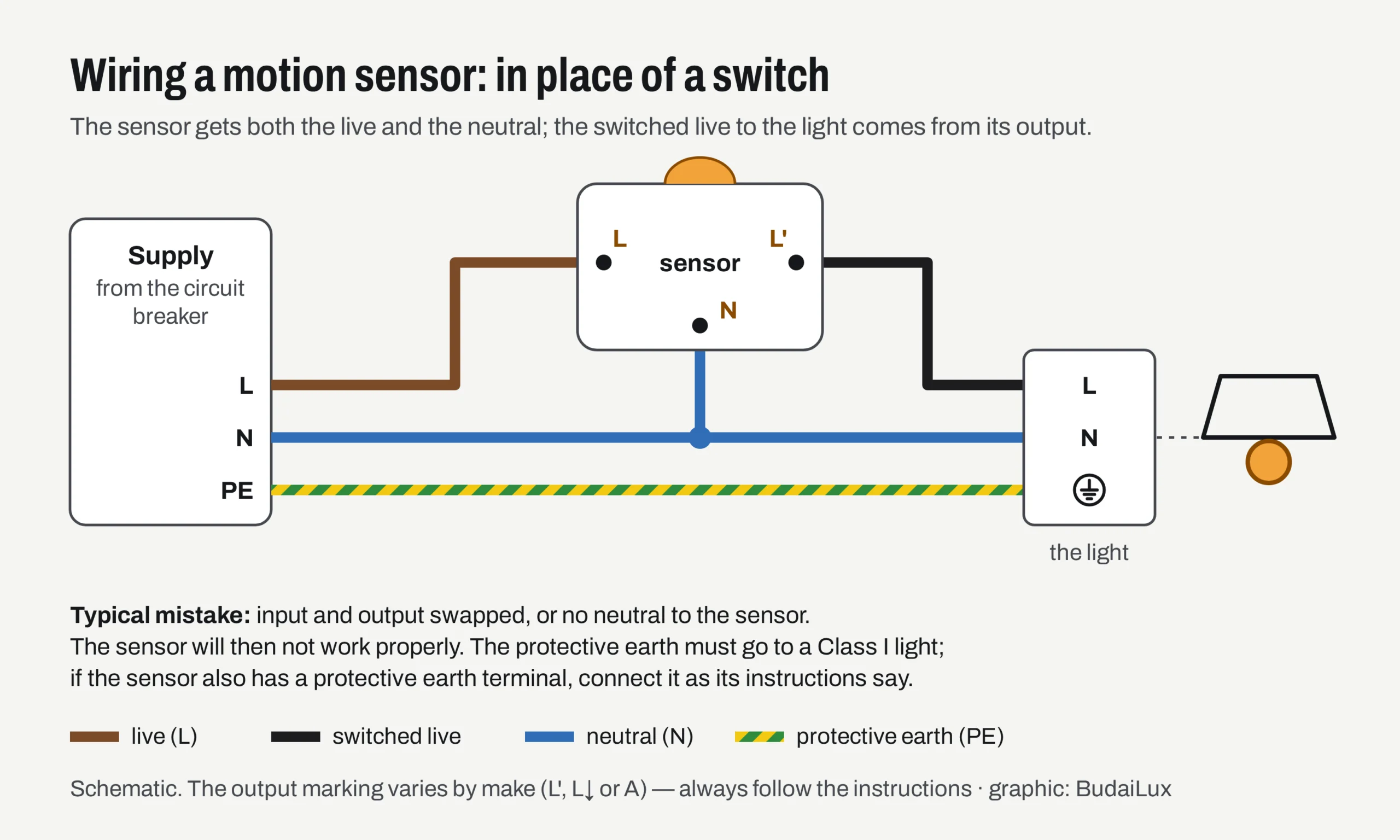
Steinel’s instructions also allow a conventional switch to be fitted in the supply, so that the sensor can be switched on and off, and specify a 10 A circuit breaker for the circuit. What each wire colour means, and how to check that there is no voltage, is shown in our article on wire colours; the general steps of connecting a light are in our guide to wiring a ceiling light or chandelier.
How does a PIR motion sensor detect movement?
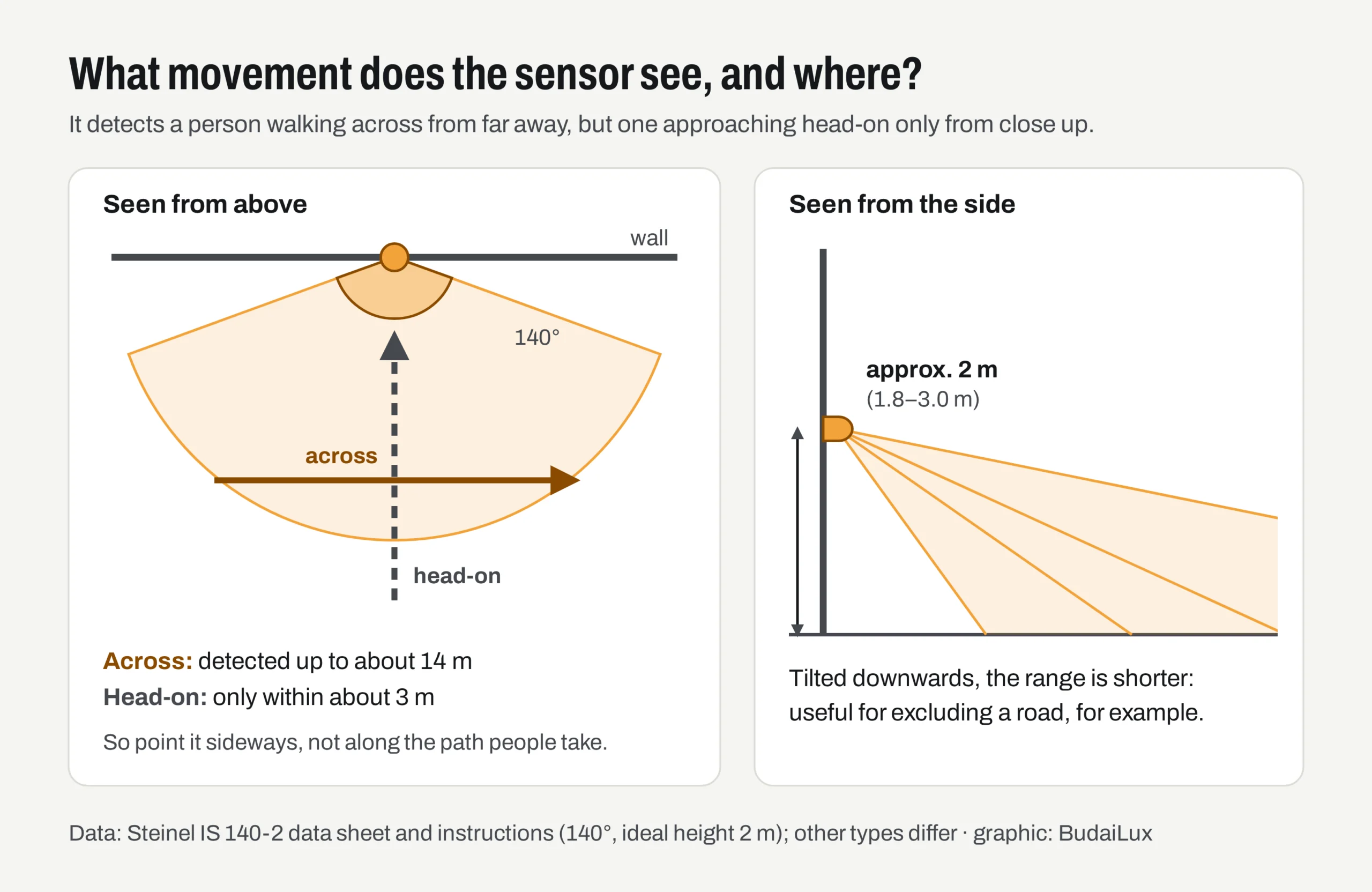
A PIR (passive infrared) sensor emits nothing: it watches for changes in the heat radiation of a body warmer than its surroundings — a person, an animal, a car. Its lens divides the field of view into zones, and it switches when the warm body crosses from one zone into the next.
This leads to the most important rule: it detects movement across its field of view from far away, but someone walking straight towards it only from close up. According to Steinel’s instructions, movement is detected most reliably when the sensor is mounted side-on to the direction of movement, and the range is limited when someone walks directly towards the sensor. According to the Steinel IS 140-2 data sheet, its range is 14 m across, but only 3 m head-on.
There is now a standard for measuring the range, too: EN IEC 63180 harmonises how the detection range of passive infrared detectors is measured and stated, separately for major motion (walking) and minor motion (for example hand movements while seated). So the range figures in two data sheets can only be compared with confidence if they were measured by the same method.
How high, and where, should the sensor be mounted?
Manufacturers typically recommend mounting outdoor wall sensors between 2 and 4 m high; for the Steinel IS 140-2, the ideal height is 2 m. The table below shows the manufacturers’ data for three common types — the figures for yours are always given in its instructions.
| Steinel IS 140-2 | Theben theLuxa S150 / S180 | Kanlux ALER JQ-30 | |
|---|---|---|---|
| Detection angle | 140° | 150° / 180° | 160° |
| Range across / head-on | 14 m / 3 m | 12 m / 5 m | max. 12 m |
| Mounting height | 1.8–3.0 m (ideal 2 m) | 2–4 m | not stated |
| LUX (light sensitivity) | 2–1000 lx | 5–1000 lx | 3–2000 lx |
| TIME (timer) | 5 s – 35 min | 30 s – 20 min | 8 s – 7 min |
| IP rating | IP54 | IP55 | IP44 |
| Load | incandescent 1000 W; LED 100–250 W, depending on the size of the lights | incandescent 2300 W; LED < 2 W: 50 W, > 2 W: 500 W | max. 1200 VA |
| Output marking | L’ | L↓ | A |
- Side-on, not facing the path. Mount it so that anyone coming along crosses the zone.
- Away from heat sources. According to Theben, it should not be near a heating vent, an air-conditioning unit or a light, and should not face plants moving in the wind or a mirror.
- The light should not be in its field of view. According to Steinel’s troubleshooting table, if the light is within the detection zone, it will keep switching on and off.
- Keeping the street out. If it also reacts to passing cars, Steinel says the sensor should be tilted further down, or the zone narrowed with masking stickers.
Outdoors, the IP rating matters too. As our article on IP ratings explains, IP44 is enough in a covered spot, under a canopy, while IP54 is the safe minimum on a wall directly exposed to rain. The Theben theLuxa P sensor is IP55 when mounted on a wall, but only IP54 on a ceiling: the rating also depends on the mounting position.
How should the LUX, TIME and SENS knobs be set?
LUX is the light sensitivity: it sets how dark it has to be before the light can switch on at all. TIME is the timer: how long the light stays on after the last movement detected. SENS is the sensitivity: according to Theben’s instructions, turning it down also reduces the range. Not every sensor has all three: the Steinel IS 140-2 and the Kanlux ALER have only LUX and TIME.
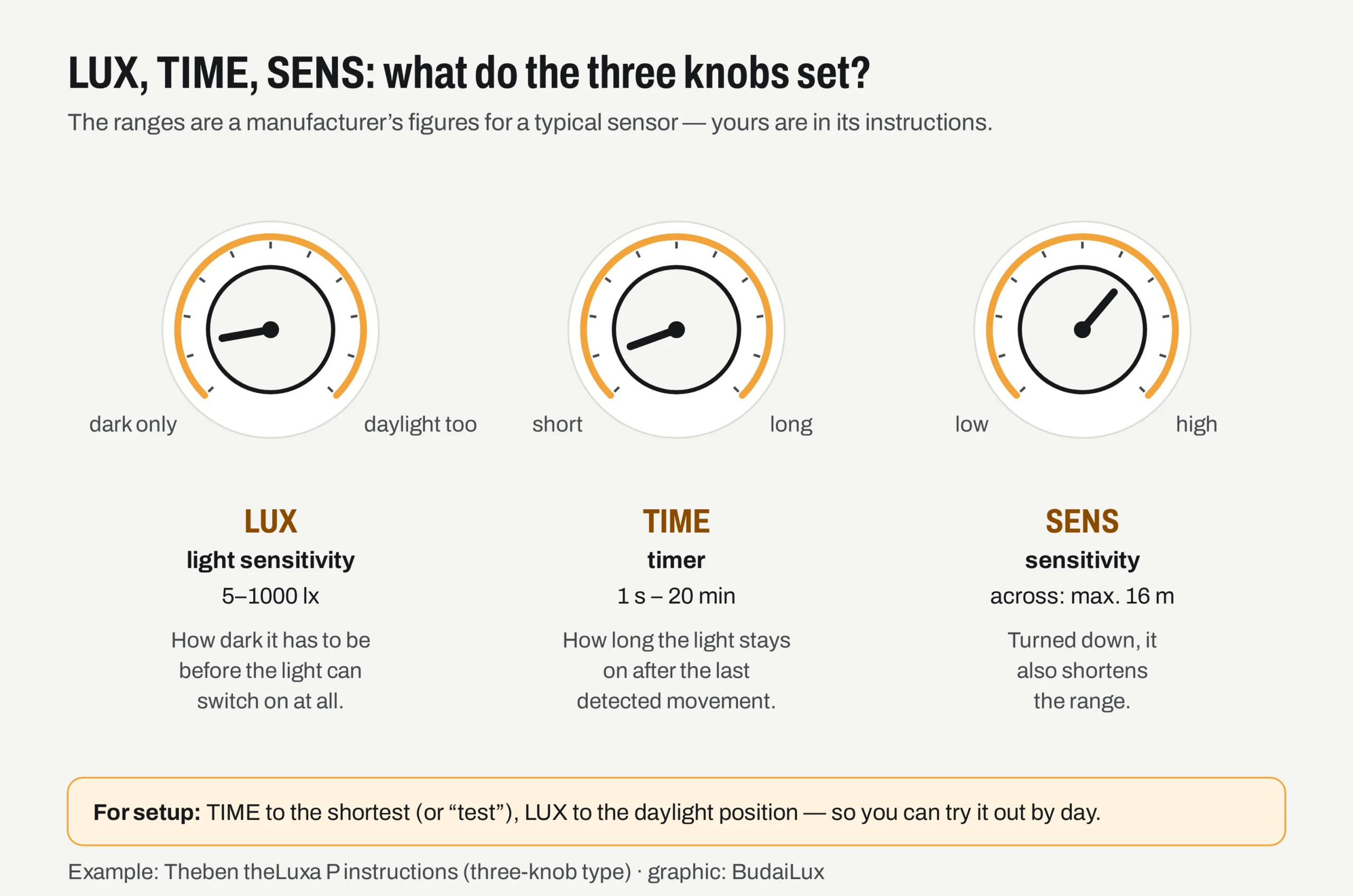
The setting sequence is similar for every type. The key is to set the zone first, in daylight with a short timer, and to leave the light sensitivity until last, at dusk.
- Wait a little after switching on. Many sensors need a warm-up time before they react; the instructions say how long.
- TIME to the shortest (or to “test”, if there is such a position). Steinel recommends setting the shortest time when adjusting the detection zone, so that every test quickly shows when it switches.
- LUX to the daylight position (sun symbol). Otherwise it will not switch on in daylight, and you cannot test it.
- SENS to maximum, if there is such a knob.
- Walk across the edge of the zone and watch where it switches on. Narrow the zone by tilting the sensor head, turning SENS down or using masking stickers, until it watches only the area you want.
- Set LUX at dusk. At the light level from which you want the light to work, turn the knob slowly from the dark (moon) position towards daylight until it switches on with movement.
- Finally, set TIME to the value you want. A shorter time is enough for an entrance; where you unload or work, you need a longer one.
How is a dusk-to-dawn sensor wired, and where should it go?
A dusk-to-dawn sensor (photocell) switches according to the light level, regardless of movement: on at dusk, off at dawn. It is wired much like a motion sensor: the Steinel NightMatic 2000 has terminals N, L and L’, and the light goes between the switched live (L’) and the neutral. A motion sensor’s LUX knob is itself a built-in dusk-to-dawn sensor; a separate one is needed if the light has to stay on all evening.
The most important rule is where it goes: the light it controls must not shine on the sensor. According to the NightMatic 2000 instructions, care must be taken that the light from the connected load does not affect how it works. If it does, the switch sees its own light as “dawn”, and the light keeps switching on and off. The instructions for Eberle’s pole-mounted dusk-to-dawn switch also ask for the sensor to face north if possible, and for no other light, such as a street light, to fall on it.
Better dusk-to-dawn sensors work with a delay, so that a flash of lightning or a car’s headlights do not switch the light off. The Theben LUNA comes with a factory-set switch-on and switch-off delay of 1 minute, precisely to prevent false switching caused by lightning and car headlights; Eberle’s device uses a switch-on delay of about 5 s and a switch-off delay of about 30 s.
Why does an LED light glow or flicker with a sensor?
LED lights draw a large current for a moment when they are switched on (inrush current), which is why a sensor can handle far fewer LEDs than incandescent bulbs. The Theben theLuxa S, for example, can switch 2300 W of incandescent bulbs, but only 50 W of LED lights under 2 W, and the manufacturer gives a maximum inrush current of 300 A for it.
A typical cause of an LED glowing or flickering while switched off is a two-wire sensor or switch without a neutral. To power themselves, these let a small current through the light even when off, and that can make a low-power LED flash. For such cases Legrand offers a compensator, which is connected in parallel with the light. According to Legrand’s catalogue, their two-wire motion sensor without a neutral needs an LED load of at least 3 W, while the three-wire version with a neutral has no lower limit — which is why a three-wire sensor with a neutral is the better choice for an outdoor light.
What if it stays on, will not switch on, or switches on by itself?
| Symptom | Common cause | What to do |
|---|---|---|
| Does not switch on | it is still too bright for the LUX setting; the neutral is missing or the wiring is wrong | wait until it is dark, or turn LUX towards daylight; have the wiring checked |
| Stays on, does not switch off | continuous movement in the zone; TIME at maximum; a Wi-Fi device too close (Steinel) | narrow the zone; reduce TIME; keep the Wi-Fi device more than 3 m away |
| Keeps switching on and off | the light is in the sensor’s field of view | readjust the zone, increase the distance |
| Switches on by itself | passing cars; branches moving in the wind; heat from heating, air conditioning or a light | tilt the sensor further down, mask off part of the zone, move it away from the heat source |
| Range changes with the seasons | the ambient temperature: in the cold it detects further, in the heat less far | Steinel advises tilting it further down in cold weather and further up in warm weather |
| Weak detection | people approach head-on; there is an obstacle in front of it; wrong height | mount it side-on, at the height the manufacturer specifies |
| LED glows when switched off | two-wire device (no neutral), load too small | a three-wire sensor or the manufacturer’s compensator |
| Dusk-to-dawn sensor keeps switching on and off | its own light falls on the sensor | move the sensor, or raise the switching threshold |
If the circuit breaker or the RCD trips, if water has got into the sensor housing, or if the light does not react at all after wiring, do not experiment any further: switch off the circuit and call an electrician. According to Theben’s instructions, sensors may only be installed by a qualified electrician.
Frequently asked questions
How do you set up a motion sensor light?
Start in daylight with a short timer: TIME to the shortest, LUX to the daylight position, SENS to maximum. Walk across the zone, and narrow it by tilting or masking until it watches only the area you want. At dusk, set LUX, and finally set TIME to how long you want the light to stay on.
What do LUX, TIME and SENS mean on a motion sensor?
LUX is the light sensitivity (how dark it has to be for the light to switch on), TIME the timer (how long the light stays on after the last movement), SENS the sensitivity (how far away it detects). The ranges differ from type to type: for the Steinel IS 140-2, for example, 2–1000 lx and 5 s – 35 min.
Why does the motion sensor not switch on in daylight?
Because the LUX knob is in the dark position, and the sensor does not let the light switch on in daylight. That is normal. To test it, turn LUX to the daylight (sun symbol) position, and back again once it has been set up.
How high should a motion sensor be mounted?
Manufacturers typically recommend 2 to 4 m for wall sensors: 1.8–3.0 m for the Steinel IS 140-2 (ideally 2 m), 2–4 m for the Theben theLuxa S. The manufacturers’ range figures apply at this height; lower or higher, the range may be shorter.
Does a motion sensor light need a separate dusk-to-dawn sensor?
Usually not: the motion sensor’s LUX knob does the same job, and lets the light switch on only when it is dark. A separate dusk-to-dawn sensor is needed if the light has to stay on all evening, regardless of movement.
Sources
- Steinel: IS 140-2 operating instructions (multilingual, PDF), IS 140-2 data sheet (English, PDF) and NightMatic 2000 dusk-to-dawn switch instructions (multilingual, PDF)
- Theben: operating instructions for the theLuxa S150/S180, the theLuxa P and the LUNA 111/112 top3 (in German, PDF)
- Kanlux: ALER JQ / ZONA JQ motion sensor instructions (multilingual, PDF) and ALER JQ-30 data sheet (English, PDF)
- Legrand: technical sheet for the 0 401 49 compensator (English, PDF) and instructions for a two-wire sensor (in French, PDF); Mosaic motion sensors catalogue page (English, PDF)
- Eberle: DÄ 56515 dusk-to-dawn switch instructions (multilingual, PDF); Hungarian Standards Institution (MSZT): MSZ EN IEC 63180:2021, the Hungarian adoption of EN IEC 63180 (measuring the detection range of PIR detectors; in Hungarian)